For city councils, boards and commissions
Live captions and translated text for public meetings.
Put them on the chamber display, residents' phones, and your livestream. Use the encoder you already have, with controls designed for recess and closed session.
English captions plus up to 8 translation languages per meeting, chosen from 75.
- No new encoder
- No resident app
- No per-viewer fees
- Pauses for closed session
Works with
- CivicCA
- Epiphan Pearl
- OBS Studio
- vMix
- YouTube Live
- Zoom
- Any RTMP or SRT encoder
Supports live captioning (WCAG 2.1 Success Criterion 1.2.4) and language access. Captions are one part of accessible meetings; they don't by themselves make an agency's website or apps meet the ADA Title II rule.
How it works
Captions start when the meeting does
No new hardware in the chamber. Point the encoder you already stream with at SentraCaptions, and speech is captioned and translated live.
-
Step 01
Send the meeting audio
Add SentraCaptions as a destination on your encoder (Pearl, OBS, vMix and others) over RTMP or SRT, next to your YouTube or website stream.
-
Step 02
Captions in about a second
Speech is captioned live and translated into each language you choose, with the names of your council members, streets and neighborhoods spelled right.
-
Step 03
Everywhere residents are
On the dais screen, on any phone by scanning a QR code, on your YouTube livestream, and in your agenda software. After the meeting, transcripts are ready to download.
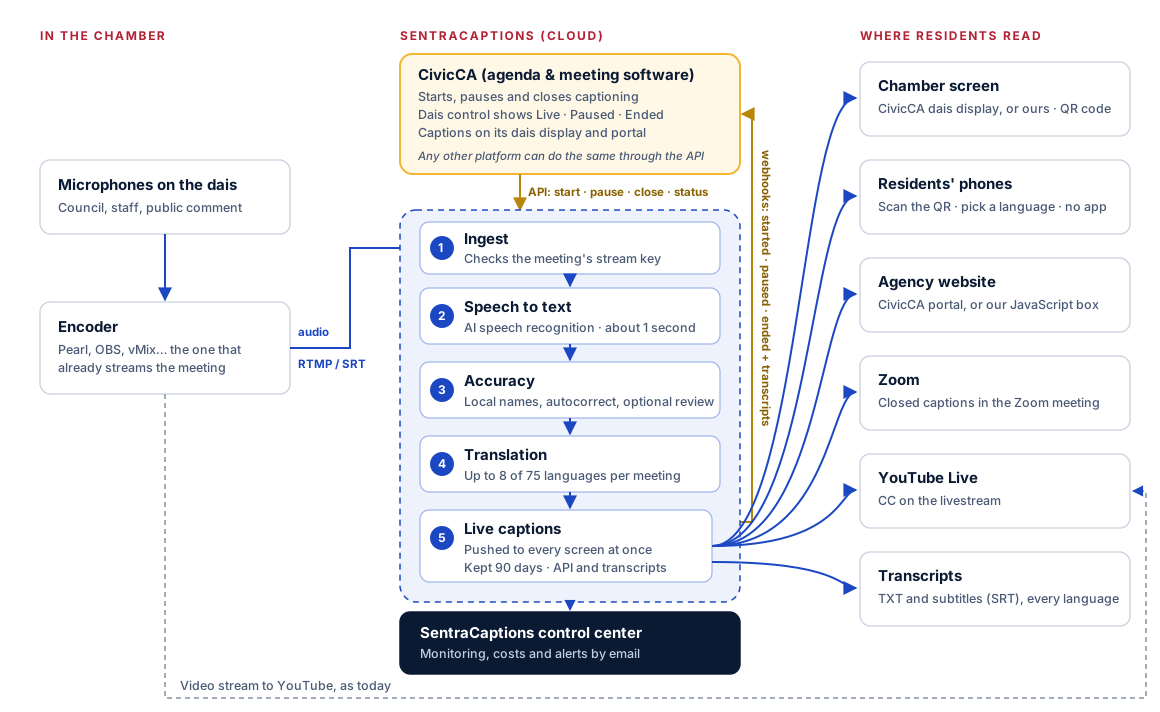
Read the diagram as text
- In the chamber: the dais microphones feed the encoder (Pearl, OBS, vMix…), which already streams the meeting. It also sends the audio to SentraCaptions over RTMP or SRT, using the meeting's stream key.
- CivicCA starts captioning when the meeting begins, pauses it for recess and closed session, and closes it at adjournment, through the SentraCaptions API. Its dais control screen shows whether captions are live, paused or ended.
- Speech to text: AI speech recognition turns speech into text in about a second.
- Accuracy: local names from the glossary, autocorrect rules, and, when turned on, a few seconds of human review.
- Translation: into up to 8 of 75 languages per meeting.
- Live captions go to the chamber screen (CivicCA's dais display or ours), residents' phones by QR code, the agency website (CivicCA's portal or our JavaScript box), Zoom closed captions, YouTube Live and transcript files.
- Webhooks tell CivicCA when a meeting starts, pauses and ends; at the end they include links to the transcripts, which CivicCA keeps with the meeting record.
- The SentraCaptions control center monitors every meeting, tracks costs, and emails our team if anything fails.
Features
Built for city halls
Made for the way public meetings actually run: long sessions, public comment in more than one language, and a clerk who has no time for another system.
-
Chamber screen
A full-screen caption display for the TV in the chamber, with one, two or more languages side by side and your meeting's title.
TV · One or more languages -
Captions on any phone
Residents scan the QR code on the screen and read along in their own language, at their own text size. Nothing to install.
QR code · No app -
Your local names
A simple glossary for council members, streets and programs, so captions and translations get them right.
Names · Streets · Programs -
Livestream and Zoom captions
Send the same captions to your YouTube Live stream and into Zoom meetings, so viewers at home and on Zoom can read along too.
YouTube Live shows one caption language per stream; translations are available on the chamber screen and phone page.
YouTube Live · Zoom -
Transcripts
Every meeting's captions in each of its languages, as text or subtitle files, for the record and for the video archive.
TXT · SRT -
Many meetings at once
Council, planning commission and committee rooms can run at the same time, each with its own screen and link.
One screen per room
75 supported languages
Choose the languages for each meeting. Spanish and other languages can update live while people speak.
- English
- Español
- 中文(简体)
- 中文(繁體)
- Tiếng Việt
- Tagalog
- 한국어
- Հայերեն
- فارسی
- العربية
- ਪੰਜਾਬੀ
- Русский
- हिन्दी
- 日本語
- Українська
- Português
- Français
- ไทย
- Afrikaans
- Shqip
- አማርኛ
- Azərbaycan
- বাংলা
- Bosanski
- Български
- Català
- Hrvatski
- Čeština
- Dansk
- دری
- Nederlands
- Eesti
- Suomi
- Français (Canada)
- ქართული
- Deutsch
- Ελληνικά
- ગુજરાતી
- Kreyòl ayisyen
- Hausa
- עברית
- Magyar
- Íslenska
- Bahasa Indonesia
- Gaeilge
- Italiano
- ಕನ್ನಡ
- Қазақ
- Latviešu
- Lietuvių
- Македонски
- Bahasa Melayu
- മലയാളം
- Malti
- मराठी
- Монгол
- Norsk
- پښتو
- Polski
- Português (Portugal)
- Română
- Српски
- සිංහල
- Slovenčina
- Slovenščina
- Soomaali
- Español (México)
- Kiswahili
- Svenska
- தமிழ்
- తెలుగు
- Türkçe
- اردو
- Oʻzbek
- Cymraeg
Integration
Works natively with CivicCA
SentraCaptions is built to work with CivicCA agenda management. CivicCA starts and pauses captioning for you as the meeting runs, and shows the captions on the CivicCA dais display, the public portal and residents' phones.
How the integration works Visit civicca.com- Starts and pauses itself
CivicCA starts captioning when the meeting begins and pauses it for recess and closed session, so you only use minutes while the meeting is in session.
- Same screens
Captions and translations appear on the CivicCA dais display and public portal.
- One team
From the people who build CivicCA, with one point of contact for both.
For developers
Add live captions to your platform
Agenda, streaming and meeting-management platforms can add live captions through one API. Create a meeting, point the encoder at its stream key, and read the captions as JSON.
- One API key per platform; each meeting has its own stream key, screen and phone links
- Pause and resume for recess and closed session
- Ready-made chamber screen and phone pages you can embed
- A webhook when each meeting ends, with transcripts and usage
- JSON
- Server-Sent Events
- TXT
- SRT
POST /v1/meetings
Authorization: Bearer sk_XXXX

{ "title": "City Council Regular Meeting",
  "languages": ["es", "zh", "vi"],
  "externalId": "agenda-2291" }

# 201 Created
{ "id": "m_XXXX",
  "state": "created",
  "ingest": { "rtmps": {
    "server": "rtmps://ingest.sentracaptions.com:1936",
    "streamKey": "m_XXXX?key=XXXX" } },
  "links": {
    "stream":  "…/v1/rooms/m_XXXX/stream?token=XXXX",
    "display": "…/display?room=m_XXXX&token=XXXX",
    "phone":   "…/live?room=m_XXXX&token=XXXX" } }
From the blog
Guides for accessible public meetings
SB 707, the ADA Title II web rule, and practical setup guides for clerks and IT staff.
- Compliance
SB 707: what changes for public meetings, and where live captions fit
A plain-language look at SB 707's Brown Act changes starting July 1, 2026, and how live captions and translation can support its goals.
- Compliance
The ADA Title II web rule and live captions: what the 2027 and 2028 dates mean
DOJ moved the ADA Title II web rule dates to April 2027 and April 2028. What that means for live meeting captions and how to use the extra time.
- CivicCA
How live captions work with CivicCA agendas and meetings
How SentraCaptions works with CivicCA: captions that start with the meeting, pause for recess and closed session, and transcripts for the video.
Computer Systems Plus
Part of the CSP public-sector family
SentraCaptions is built and supported in Fresno by Computer Systems Plus, a family-owned company serving California public agencies since 1990, alongside CivicCA, Sentra 311, SentraCheck, GOVvpat and SentraDeed.
- Trust
Security and data
Where meetings are processed, how long captions are kept, and who can read them.
Security → - Pricing
Priced for public budgets
Buy minutes as you need them, or prepay. Paused time isn't used.
Pricing → - About
One Fresno team
The people who build CivicCA build SentraCaptions, at the same address and the same phone number.
About us →